



Home / R&D
R
&
D
NLX / OUR PROCESS SOFTWARE
NovaLynx actively participates in industrial research.
Request a demo ↗
Discover the seven modes
WINDOWS APPLICATION · FRENCH / ENGLISH INTERFACE · ROBOT TRAJECTORY SIMULATOR
01
Who is this for
Each attempt costs one booth slot,
of the product and of time.
An adjustment can be discussed, a program can be corrected, an operator can be trained. Each of these steps costs a booth slot, product, and time. NLX Paint Studio moves part of this work to the screen, in an environment where every trial leaves a searchable record.
INDUSTRIAL DIRECTION
Make decisions based on a case file, not on a memory of a trial
Compare two settings, two products, or two applicators on the same part, on screen. Each study keeps the recipe, program, layers, and results, and can be exported as a shareable report. Discussions with the client, the engineering department, and the workshop are all based on the same document.
WORKSHOP MANAGER
Working on the movement and the program in peace
The operator paints with the mouse within a defined context, replays their pass, and reads its consistency. The nozzle program is generated, edited point by point, and exported. None of this immobilizes the booth or consumes product: the actual slot is reserved for what really needs to be done there.
02
The course
From preparation to export,
in five steps.
The software guides the study from start to finish. The Free Paint, Training, and Labs modes adapt these steps to their activity, and the study is preserved when switching modes.
01
Prepare
Select the reference part and process: applicator, product, flow rate, distance, speed, overlap, thickness target.
02
Trajectory
Generate passes — horizontal, vertical, spiral scanning — or adjust the program points one by one.
03
Simulate
Launch the application and follow the calculated deposit, in fast-forward play up to ×16.
04
Analyze
Inspect the film, compliance with the target, the material balance, and the gap between two tests.
05
Export
Combine your report, maps, schedule, and session into a study folder.


01 — PREPARE · CHOICE OF CONTEXT AND SETTINGS OF A TEST / 02 — TRAJECTORY · NOZZLE PROGRAM EDITABLE POINT BY POINT
03
Seven workspaces
Seven spaces,
only one study.
Methods, training, design offices, and laboratories do not perform the same actions. Yet, they work on the same part, the same recipe, and the same program, which circulate from one mode to another.
03 / VIRTUAL ROOM
Trajectory Editor
Generate passes, edit coordinates and trigger, control the continuity of a nozzle program.
04 / VIRTUAL ROOM
Robot cell editor
Declare a base, a range, and a limit speed for a preparatory geometric control of the points, then export the program in the base reference frame.
05 / VIRTUAL ROOM
Simulator
Prepare the process, start the deposition, and analyze the film through the different control views.
06 / LABORATORY
Paint lab
Explore catalog products, prepare recipes, and compare tests and layer stacking.
07 / LABORATORY
Spray lab
Adjust the spray profile and create a simulated fixed footprint to study its distribution.
REFERENCE CATALOG
What is provided
4 integrated parts · 4 reference applicators · 7 products from the internal catalog · 8 frozen layers and 1 active layer.

SEVEN GUIDED TOURS, A SHARED STUDY
04
The control views
Watch the movie
from multiple angles.
The 3D view provides a clear reading of the finish. The maps show the distribution of the calculated film. The hover probe, the area-weighted histogram, and the mass balance complete this analysis.
ASPECT
The finish as it appears, the material and color of the selected product.
THICKNESS & COMPLIANCE
Calculated dry film distribution and deviation from target, with hover probe and histogram.
DISTANCE & RUNS
Nozzle-to-surface distance along the path and drip risk zones in the model.

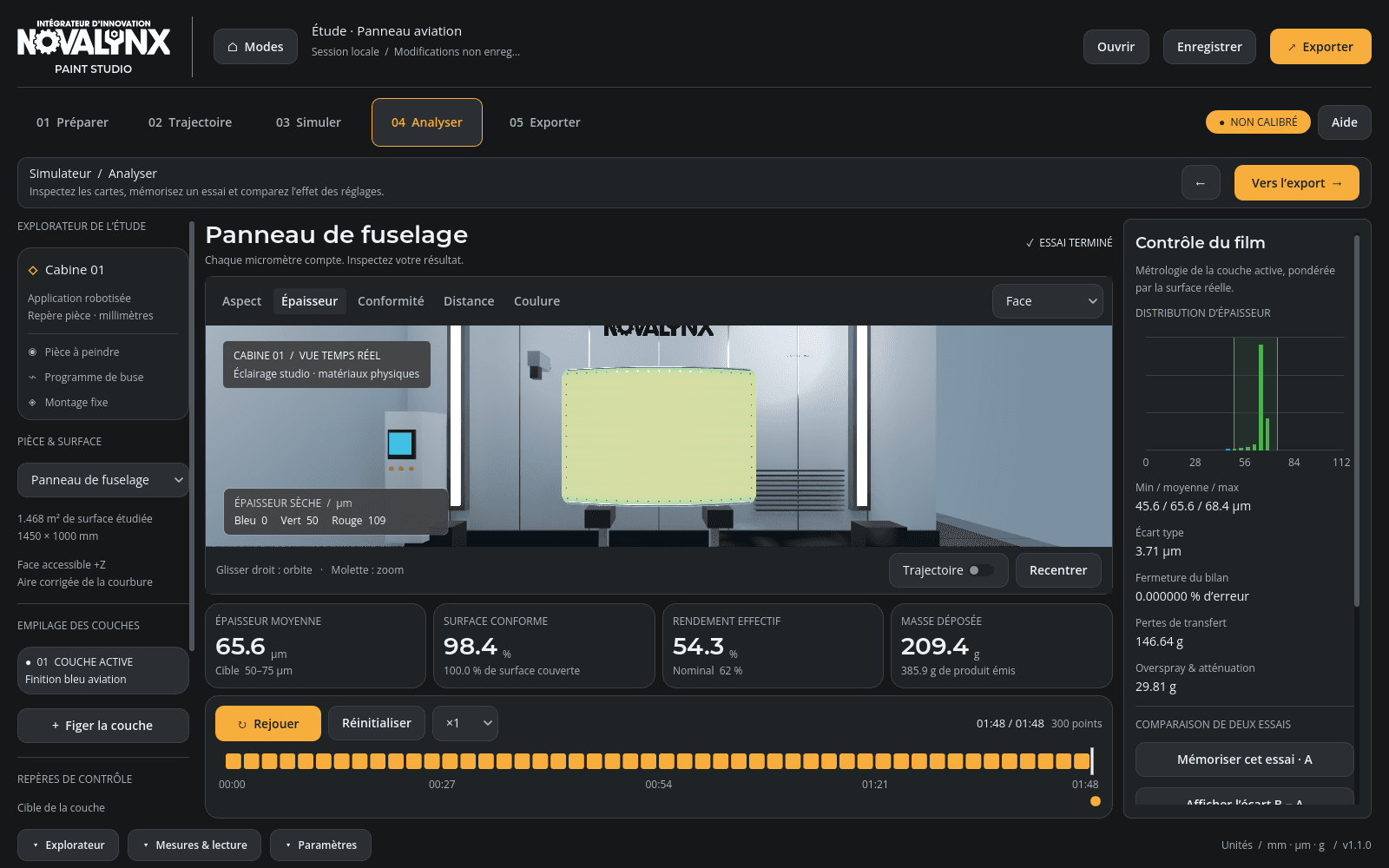
COMPLIANCE WITH THE TARGET ON A SIMULATED EXAMPLE / THICKNESS MAP, HISTOGRAM, AND LAYER ASSESSMENT
READING OF NUMBERS
The values shown in the screenshots are from an example calculated in the model. They do not represent workshop measurements or a guarantee of industrial performance.
05
Gesture, products and cell
The same environment,
four ways to work on it.

TRAINING — LOCKED-SETTING EXERCISE; THE DISPLAYED SCORE IS NOT AN OPERATOR QUALIFICATION

PAINT LAB — INTERNAL CATALOG PRODUCTS; FORMULATION AND NON-SIMULATED DRYING

SPRAY LAB — ONE SECOND OF SIMULATED DEPOSITION; THE PRINT DOES NOT CALIBRATE A REAL DEVICE

ROBOTIC CELL — PREPARATORY GEOMETRIC CONTROL OF POINTS, WITHOUT AXES OR COLLISIONS
06
Workstation
A suitable space
to your way of working.
The dark theme brings the 3D view and results to the forefront. The explorer, settings, and measurement panel collapse independently to maximize the scene. Choose from four accents — orange, blue, yellow, or green — with your preferences saved for the next time you open it.
— Interface entirely in French.
— Three retractable panels: explorer, settings, measurements.
— Canceling the last five changes.
— Local backup of the study, recipes, and gestures.

THE THREE FOLDED PANELS, THE FULL-WIDTH SCENE
07
Deliverables
The work doesn't stop
on screen.
The export folder contains a standalone HTML report, printable as a PDF, the cabin view, a thickness map, and the result files. Trajectories and recipes are saved separately; the session retains the layers and parameters to continue the study.
REPORT
Standalone HTML, printable to PDF, embedded resources.
IMAGES
Cabin view and control boards in PNG.
DATA
Results and trajectories in CSV and JSON, reusable.
SESSION
Complete status of the study, to resume work later.

LAST STEP OF THE PROCESS: EXPORTING THE STUDY
FORMATS: HTML · PNG · CSV · JSON
08
Our approach
Process software is only worth
than what verifies it.
We do not take a calculation for granted just because it produces a plausible image. Every brick follows the same path: a written hypothesis, an independent calculation that confirms or contradicts it, and an automatic verdict replayed with every release.
01 / HYPOTHESIS
Write down what is expected before measuring
The expected result is set manually, or by a formula written in a different format than code. A two percent deviation can no longer be considered "normal".
02 / INDEPENDENT CALCULATION
Two paths to the same number
C++ metrology versus Python metrology, mass balance versus analytical profile, simulator versus external audit. When two calculations that share nothing agree, the figure has meaning.
03 / AUTOMATIC VERDICT
A door that nothing crosses without proof
Each delivery replays the digital checks and a complete graphical path of the binary, on both renders. Any measurement that drifts blocks the delivery until it is explained.
30
Successful digital checks on delivery 1.1.0
2 × 21
Captures of a complete graphics pipeline run, first under Vulkan then OpenGL
7
Modes, steps, and exports completed during each check
SHA-256
Hash of the reference executable, attached to the delivery
NLX / RESEARCH PROGRAM — THE DEPOSIT MODEL
The validation bench that holds the calculation
In parallel with the distributed software, our research on paint deposition is supported by an independent validation bench: two independent implementations of surface metrology that agree to within 0.05%, mass balance recovered at 62.000% for 62% nominal, spray jet profile compared to its analytical formula to within 0.000272%, and hidden-face occlusion — without which, a perforated part received 52% of fictitious deposition. Compliance is determined according to ISO 14253-1: uncertainty is subtracted from the tolerance before drawing a conclusion.
This work explains why we announce so clearly what the software does not do.
09
Announced scope
A preparation tool
and understanding.
Software whose limitations are kept quiet would be dangerous to use. Here they are, as they appear in our technical documentation.
WHAT THE SOFTWARE DOES
— Visualize and compare simulated trials on the same part.
— Prepare a nozzle path and export its points.
— View a calculated thickness map and conformity to a target.
— Perform a mouse gesture within a defined context.
— Group recipe, program, results, and session within a study.
WHAT IT DOES NOT DO
— The model is uncalibrated and limited to the accessible face along +Z: back faces and cavities are not evaluated.
— The 3D robot is for illustrative purposes. Cell control is based on a declared envelope, without kinematics, without collisions, and without a qualified manufacturer program.
— No general CAD import: four integrated geometries, import is for CSV/JSON trajectories.
— No air flow, drying, or dynamic sagging calculations.
— Windows x86-64 application. No browser, macOS, tablet, or virtual reality version.
Simulated trials are used to explore and compare settings within this scope. They do not replace validation on real equipment — and the measurement campaign on your installation is part of what we know how to conduct with you.
10
Frequently Asked Questions
What is being asked of us
most of the time.
Does the simulator work in a browser?
No. Version 1.1.0 is a native Windows application. This page presents the product; the simulation engine runs locally within the application.
Can we work without a connection?
Computation and files are local. No account or network service is required to use the engine.
Can we import our own parts?
The current version offers four built-in geometries. It does not provide a general user import for CAD, FBX, or GLB. File importing is limited to CSV/JSON trajectories. If your needs involve your own parts, let's talk: this is a scoping discussion, not a checkbox option.
Are the results calibrated against real equipment?
No. The provided parameters are uncalibrated references, and the interface displays them clearly. The calculation allows for comparing tests within its scope; it does not provide a certified thickness measurement or a process qualification.
Does the software validate the movements of an industrial robot?
No. Cell mode checks point distances to a declared base and average speeds between points. It does not resolve axes, orientations, or collisions, and does not produce a qualified manufacturer program.
What are the system requirements?
The application is distributed for Windows x86-64, using Vulkan rendering with an OpenGL compatibility launch option. It has been tested at 1600 × 1000 and 1280 × 800 resolutions on an NVIDIA RTX 3080 Ti laptop GPU. This test configuration is not a guaranteed minimum hardware requirement; your system's compatibility can be verified during the demonstration.
How do I know which offer is right for my needs?
Licenses, support services, and support conditions are defined based on your usage. Present your painting application to us: we will build the demonstration and proposal around what you are looking to decide.
Can we compare multiple trials?
Yes. A test A can be saved, then compared to a test B on the same part. Tolerance limits can be re-evaluated without stripping the paint, and process changes can be undone.
11
Your process
Let's talk about your
paint application.
Do you need to present a process, train an operator, develop a trajectory, or decide between two settings? Describe your needs to us: we will build a demonstration around your specific use case and the scenarios that matter to you.
Request a demo ↗
Pricing, licensing, and services: please contact us.